
How an Icinga Web Filter Is Built
Every filter is made of conditions, and every condition consists of a column, an operator, and a value:
host.name=web01Here, host.name is the column, = the operator, and web01 the value. Columns are always written from the point of view of the list you’re on: in the service list, both service.name and host.name work, because every service belongs to a host. You don’t have to remember column names, though. Start typing in the search bar and the suggestions show you what’s available. Once you’ve entered a condition, the search bar shows the column’s label, e.g. “Host Name” instead of host.name. The URL always contains the actual column name.
Icinga Web Filter Operators
| Operator | Meaning | Example |
|---|---|---|
= |
equals | host.name=web01 |
!= |
does not equal | host.name!=web01 |
~ |
like | host.name~web* |
!~ |
unlike | host.name!~*-test |
> |
greater than | host.max_check_attempts>3 |
>= |
greater than or equal | host.max_check_attempts>=5 |
< |
less than | host.max_check_attempts<5 |
<= |
less than or equal | host.max_check_attempts<=3 |
Wildcards with Like and Unlike
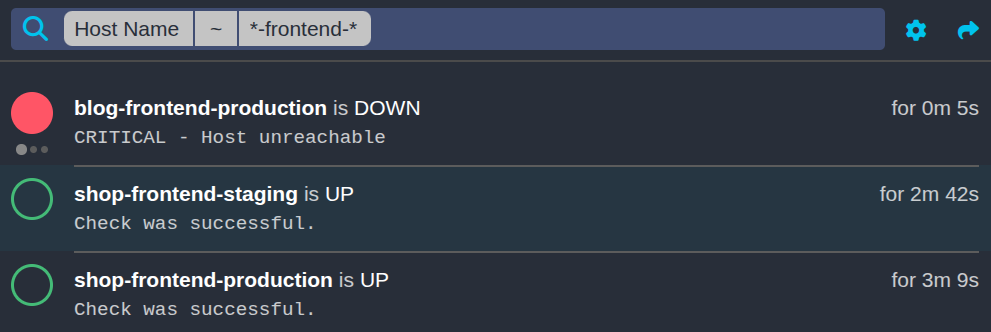
The like (~) and unlike (!~) operators allow you to use * as a wildcard. host.name~web* matches every host whose name starts with web, while host.name!~web* matches every host whose name doesn’t. A wildcard can go at any position in the value, and you can use as many as you need: host.name~*-frontend-* matches every frontend, no matter which app or environment, but not shop-database-production.
Wildcards only work with ~ and !~: host.name=web* looks for a host that is literally named web*.
Combining and Negating Conditions
Conditions can be combined with & (and) and | (or):
host.name~web*&host.state.soft_state=1
host.name=web01|host.name=web02
Use parentheses to group conditions:
(host.name=web01|host.name=web02)&host.state.soft_state=1
Without the parentheses, & binds stronger than |, just like multiplication binds stronger than addition. So host.name=web01|host.name=web02&host.state.soft_state=1 means “web01, or web02 if it is down”, which is probably not what you meant. When in doubt, add parentheses.
A ! in front of a condition or a group negates it:
!host.name=web01
!(host.name=web01|host.name=web02)
Search Bar vs. Search Editor
The search bar is the quickest way to type a filter, but once you nest groups inside groups, it gets hard to keep track of which parenthesis closes what. That’s what the search editor is for: click the filter icon next to the search bar, and it shows the same filter as a tree. You can add, remove, and negate conditions and groups there, and switch between & and | for each group, without counting parentheses.
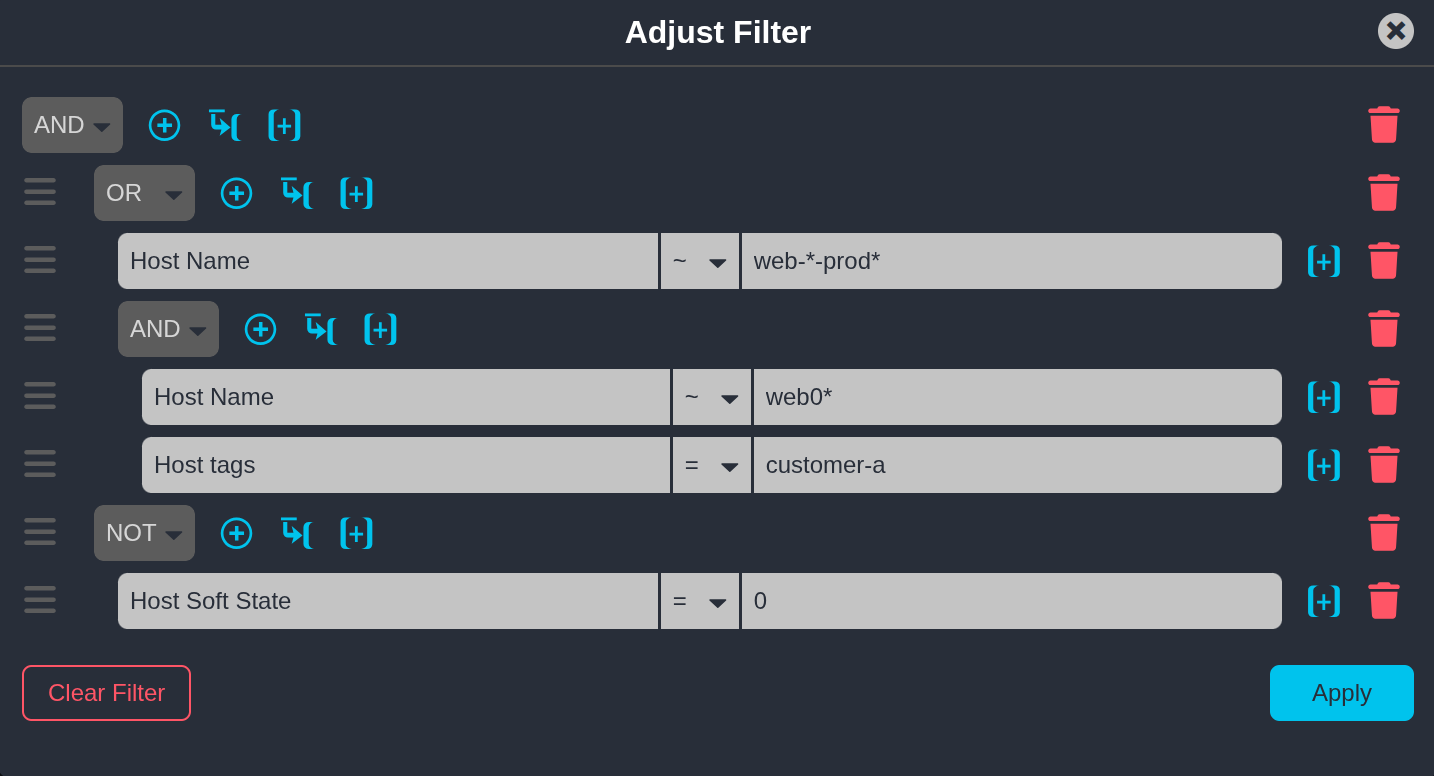
Both edit the same filter, so you can start in the search bar and switch to the editor whenever it gets complicated, or the other way around.
Custom Variables in an Icinga Web Filter
Custom variables are available as host.vars.<name> and service.vars.<name>:
host.vars.env=production
service.vars.team~web*
It makes no difference where the variable was defined. Whether you wrote it into a config file or created it in the Icinga Director, it is addressed the same way in a filter.
That covers simple values. But custom variables can also be arrays and dictionaries, and Icinga DB stores them in a way that lets you filter on each value inside them. Take this host:
object Host "web01" {
  check_command = "hostalive"
  address = "192.0.2.10"

  vars.tags = [ "web", "customer-a" ]
  vars.http_vhosts = {
    "shop" = {
      http_uri = "/shop"
      http_ssl = true
    }
    "blog" = {
      http_uri = "/blog"
    }
  }
}
Arrays
Use [] to address the index you want to filter on:
host.vars.tags[0]=web
Most of the time, though, you don’t care about the position, only about whether the array contains a value at all. Use the wildcard [*] to match any index:
host.vars.tags[*]=customer-a
This matches every host whose tags contain customer-a, no matter where in the array it is.
Dictionaries
Dictionary keys are addressed with dots:
host.vars.http_vhosts.shop.http_ssl=true
Arrays and dictionaries can be nested to any depth, and the path always follows the structure of the variable, e.g. host.vars.a.b[1].c.
Filtering on Relations
A host can be a member of several host groups, and a service of several service groups. Filtering on them works like on any other column:
hostgroup.name=linux-servers
Here, = requires the host to be a member of the given host group, no matter which other groups it is in.
The Icinga Web Filter in a Nutshell
An Icinga Web filter comes down to a few rules: every condition is column, operator, value; wildcards need ~ or !~; & binds stronger than |; and custom variables can be filtered all the way down into arrays and dictionaries. Everything you type in the search bar ends up in the URL, so once a filter works, you can bookmark it, share it, or save it as a dashlet. Want to try it without a setup of your own? The Icinga demo has everything in place.