The OTLPMetricsWriter is a new Icinga 2 feature available since v2.16 that exports check plugin performance data as OpenTelemetry-compliant metrics via the OTLP HTTP protocol. With a single configuration object, it connects Icinga 2 to any OTLP-compatible backend like Prometheus, Grafana Mimir, Datadog, Elasticsearch, VictoriaMetrics, and more.
If you’ve been running Icinga 2, you know the story: your check plugins generate valuable performance data, and you’ve been sending it to Graphite, InfluxDB, or maybe the PerfdataWriter. These tools work well, but they lock your metrics into specific pipelines. Want to also see those metrics in Grafana Mimir? Or correlate them alongside application traces in Jaeger? That meant building custom bridges, maintaining extra tooling, or simply going without.
With Icinga 2 v2.16, that changes. The new OTLPMetricsWriter speaks the OpenTelemetry Protocol (OTLP) natively, turning Icinga 2 into a first class participant in the OpenTelemetry ecosystem.
What Is OpenTelemetry, and Why Should You Care?
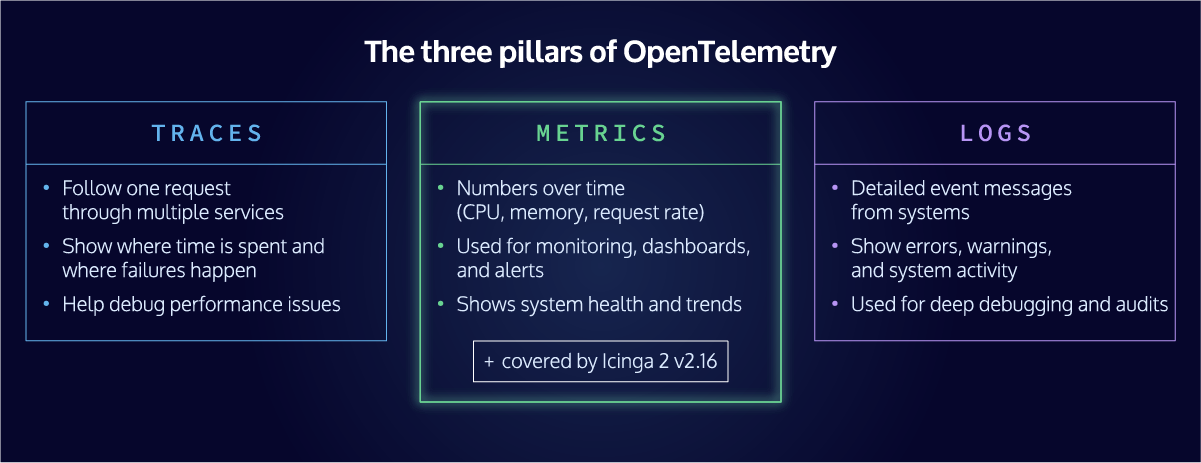
OpenTelemetry (often abbreviated as OTel) is an open source observability framework maintained by the Cloud Native Computing Foundation (CNCF). It provides a vendor neutral standard for collecting, processing, and exporting telemetry data: metrics, traces, and logs.
Think of it as a universal language for observability. Instead of writing separate integrations for every backend you want to use, you instrument once using the OpenTelemetry standard and export to any compatible destination. Prometheus, Grafana, Datadog, Elastic, Splunk, New Relic, Dynatrace, OpenSearch, VictoriaMetrics: they all speak OTel.
In 2026, OpenTelemetry has become the default data layer for modern observability. Major cloud providers support it natively. Every significant monitoring and observability vendor accepts OTLP data. For infrastructure monitoring tools like Icinga 2, supporting OpenTelemetry is no longer a nice to have. It is essential for staying relevant in a world where teams expect their tools to work together seamlessly.
What the OTLPMetricsWriter Does
The OTLPMetricsWriter is a new Icinga 2 feature that takes the performance data your check plugins already produce and exports it as OpenTelemetry compliant metrics via the OTLP HTTP protocol.
Here’s what that means in practice: every time Icinga 2 runs a check and receives performance data (CPU load, disk usage, network throughput, response times, anything your plugins measure), the OTLPMetricsWriter transforms that data into properly structured OpenTelemetry metrics and sends them to any OTLP compatible endpoint.
The implementation is lightweight and purpose built. Rather than bundling the full OpenTelemetry C++ SDK (which would have added significant complexity and dependency overhead), the Icinga team implemented a focused OTLP HTTP client that does exactly what’s needed: export metrics reliably, using Protocol Buffers serialization as the OTLP specification requires.
Key technical details worth knowing:
Performance data becomes gauge metrics
Each piece of performance data from your check results is transformed into an OpenTelemetry Gauge data point. If your check_load plugin returns load1=0.5, load5=0.3, and load15=0.2, each of those becomes a properly attributed metric in the OpenTelemetry data model.
Thresholds are first class metrics
When enabled via enable_send_thresholds, warning, critical, min, and max threshold values are exported as a dedicated state_check.threshold metric stream. Each data point carries a threshold_type attribute that identifies which kind of threshold it represents, making it straightforward to overlay threshold lines on your Grafana dashboards or use them in alerting rules.
Persistent HTTP connections
The writer maintains a long lived connection to the collector and uses HTTP/1.1 chunked transfer encoding to stream metrics efficiently, without buffering entire messages in memory first.
Rich resource attributes
Each metric carries context about its origin, including the Icinga host name, service name, check command, and a configurable service namespace, all following OpenTelemetry’s semantic conventions. This means your metrics arrive at the backend with enough context to be immediately useful.
Custom resource attributes for deeper context
Beyond the built in attributes, you can enrich your metrics with custom resource attributes using host_resource_attributes and service_resource_attributes. These support Icinga macros, so you can pull values directly from your host and service objects. Want to tag every metric with the datacenter, operating system, or environment? Just add something like host.os = "$host.vars.os$" and it will be populated automatically for each host. Custom attributes are prefixed with icinga2.custom. to avoid naming conflicts.
Configurable service namespace
The service_namespace resource attribute (defaulting to icinga) can be customized per writer instance. Set it to production, staging, or any other value that reflects how you want to categorize your metrics in the OpenTelemetry backend. This is especially useful when multiple Icinga environments send metrics to the same collector.
High availability built in
The OTLPMetricsWriter supports Icinga 2 HA cluster zones out of the box, with enable_ha = true as the default. Only one endpoint in the cluster actively sends metrics at a time, with automatic failover if the active endpoint loses cluster connectivity. This means no duplicate metrics in your backend and no manual configuration needed for typical HA setups.
How to Enable It
Enabling the OTLPMetricsWriter follows the same pattern as any other Icinga 2 feature. First, enable it:
icinga2 feature enable otlpmetrics
Then configure the OTLPMetricsWriter object in /etc/icinga2/features-enabled/otlpmetrics.conf. Here’s a minimal example that sends metrics to a local OpenTelemetry Collector:
object OTLPMetricsWriter "otlp-metrics" {
  host = "otel-collector"
  port = 4318
}
If you want to send metrics directly to a backend that supports OTLP ingestion natively (like Prometheus or Grafana Mimir), you can point the writer at that endpoint instead:
object OTLPMetricsWriter "prometheus" {
  host = "prometheus"
  port = 9090
  metrics_endpoint = "/api/v1/otlp/v1/metrics"
}

object OTLPMetricsWriter "mimir" {
  host = "mimir"
  port = 8080
  metrics_endpoint = "/otlp/v1/metrics"
}
You can define multiple OTLPMetricsWriter objects to send metrics to several destinations simultaneously. Each writer maintains its own connection and operates independently. Want thresholds included as separate metrics? Enable them:
object OTLPMetricsWriter "otel" {
  host = "otel-collector"
  port = 4318
  enable_send_thresholds = true
}
Integration Possibilities: Where Can Your Metrics Go?
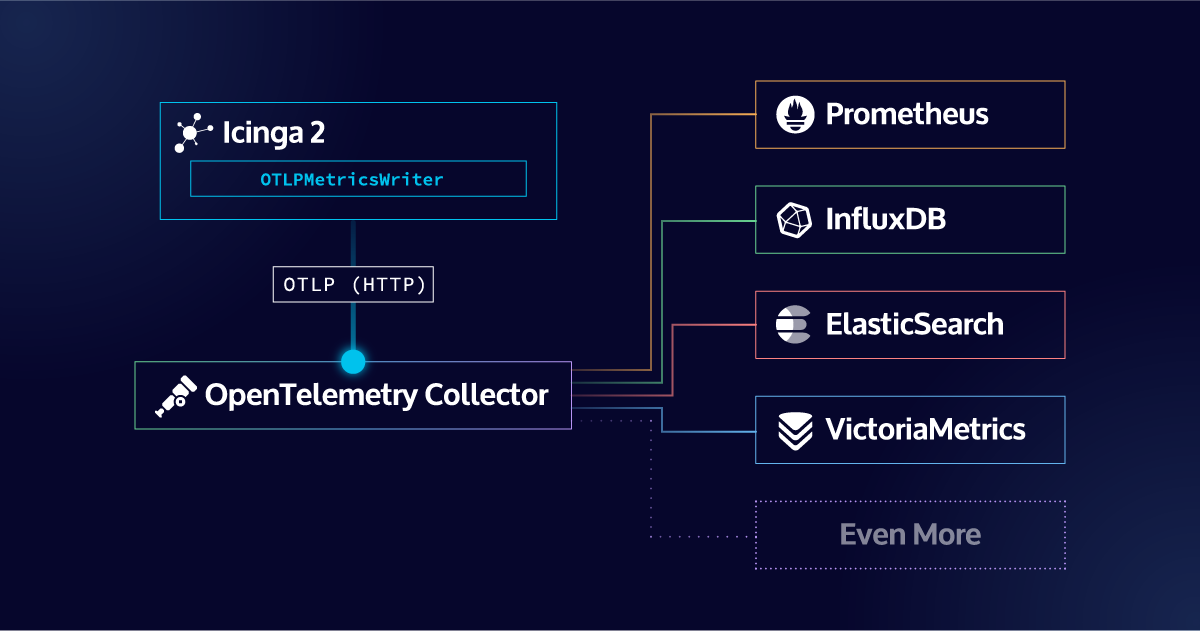
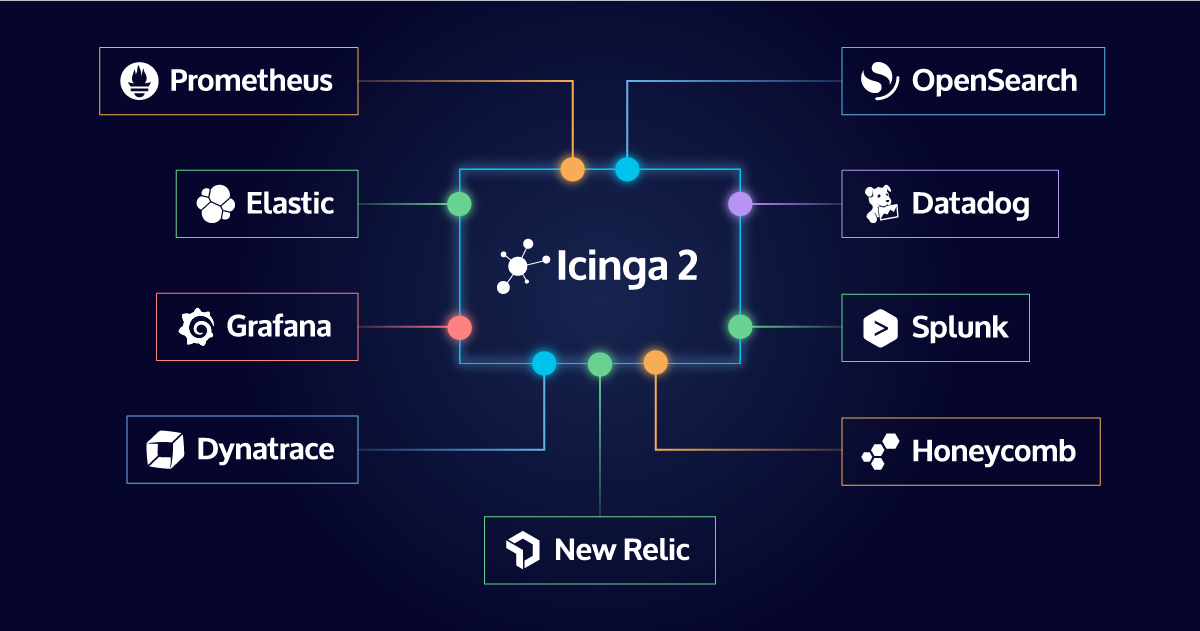
This is where the OpenTelemetry integration truly shines. By speaking OTLP, Icinga 2 can now send metrics to virtually any modern observability platform. Here’s a look at the most popular destinations and what they enable.
Prometheus and Grafana
The most natural fit for many Icinga users. Send your metrics through the OpenTelemetry Collector with a Prometheus exporter, or send them directly to Prometheus using its native OTLP receiver (available since Prometheus 2.47). From there, visualize everything in Grafana with full PromQL support.
This combination lets you build dashboards that blend Icinga monitoring data with application metrics, Kubernetes stats, and anything else in your Prometheus ecosystem, all in a single pane of glass.
Grafana Mimir, Cortex, and Thanos
For larger deployments that need long term metric storage and horizontal scalability, Grafana Mimir (and its predecessors Cortex and Thanos) accept OTLP data natively. This means Icinga metrics can be stored alongside your application metrics at enterprise scale, with the same query interface and alerting rules.
VictoriaMetrics
VictoriaMetrics is a high performance, resource efficient time series database that has become a popular alternative to Prometheus. It supports native OTLP ingestion, so you can send Icinga metrics directly to its /opentelemetry/v1/metrics endpoint without any translation layer. Combined with PromQL compatible querying and Grafana integration, it offers a lightweight but powerful backend for your Icinga performance data.
Datadog
Datadog’s OTLP ingestion pipeline accepts metrics directly from an OpenTelemetry Collector. This integration lets organizations that run Datadog for application performance monitoring bring their Icinga infrastructure metrics into the same platform, enabling correlation between infrastructure health and application behavior.
Elasticsearch
The Elastic Stack supports OTLP ingestion through its Elasticsearch time series data streams server. Icinga metrics flowing into Elasticsearch can be visualized in Kibana alongside logs and APM traces, giving you a unified view of infrastructure and application health.
OpenSearch
OpenSearch Data Prepper accepts OTLP metrics and indexes them in OpenSearch. This has been tested and confirmed working with the OTLPMetricsWriter during development. It’s a strong option for organizations that prefer the open source OpenSearch stack.
Splunk
Splunk’s Observability Cloud accepts OTLP data through their own OpenTelemetry Collector Distribution. Infrastructure teams using Splunk can now ingest Icinga metrics natively without custom scripts or intermediary tools.
New Relic, Dynatrace, Honeycomb, and Others
Nearly every commercial observability platform now accepts OTLP data. If your organization uses any of these tools for application observability, you can now include Icinga infrastructure metrics in the same platform with minimal configuration.
The OpenTelemetry Collector as a Hub
For maximum flexibility, route your metrics through the OpenTelemetry Collector. The Collector acts as a processing pipeline where you can filter, transform, batch, and fan out metrics to multiple destinations simultaneously. Want the same Icinga metrics in Prometheus for dashboarding AND in Elastic for correlation with logs? The Collector makes that a single config change.
What This Means for Your Monitoring Strategy
The OTLPMetricsWriter doesn’t replace your existing Icinga setup. Your checks, notifications, Icinga Web interface, and Icinga DB all continue to work exactly as before. What changes is where your performance data can go, and that shift opens up significant possibilities.
Break free from tool silos
With OpenTelemetry, your Icinga metrics are no longer confined to a single visualization tool. Teams can use whichever frontend they’re most comfortable with while drawing from the same data.
Unify infrastructure and application observability
The biggest gap in many organizations’ monitoring is the disconnect between infrastructure metrics (what Icinga watches) and application performance data. OpenTelemetry bridges that gap. Your Icinga metrics can live alongside application traces and custom business metrics in a single observability backend.
Future proof your metrics pipeline
Backend vendors come and go. Migration between observability platforms is notoriously painful. With OpenTelemetry as your data layer, switching backends means changing a Collector configuration, not re instrumenting your entire stack.
Simplify your architecture
If you’re currently running Graphite or InfluxDB solely to store Icinga performance data, you can evaluate whether an OTLP based pipeline better fits your needs. For organizations already running Prometheus or another OTel compatible backend, the OTLPMetricsWriter eliminates the need for a separate metrics store.
How to Get Started with OTLPMetricsWriter in Icinga 2
The OTLPMetricsWriter is available in Icinga 2 v2.16. Check the official documentation for the full configuration reference and additional examples.
If you’re already using Icinga 2 with any modern observability backend, this feature is the simplest path to getting your infrastructure monitoring data where it needs to be. Configure one object, point it at a collector, and your metrics are part of the OpenTelemetry ecosystem.
If you want to see the OTLPMetricsWriter in action – from configuration to live metrics in Grafana – join our webinar on Icinga and OpenTelemetry metrics on June 30, 2026 or watch the recording after that date.
Have questions or feedback? Join the Icinga community channels or open an issue on GitHub.
FAQ
Do I need to replace my existing Icinga setup to use OpenTelemetry?
No. The OTLPMetricsWriter is an additional feature that works alongside your existing Icinga 2 configuration. Your checks, notifications, Icinga Web interface, Icinga DB, and any other writers you have configured (Graphite, InfluxDB, etc.) all continue to function exactly as before. You can run OTLP export in parallel with your current setup, or gradually migrate depending on your needs.
Does the OTLPMetricsWriter support traces and logs, or only metrics?
Version 2.16 focuses exclusively on metrics export. Traces and logs are not part of this initial release. The feature is named OTLPMetricsWriter intentionally to leave room for future components.
Which OpenTelemetry backends are officially tested with Icinga 2?
During development, the OTLPMetricsWriter was tested with the OpenTelemetry Collector, Prometheus (via its native OTLP receiver), Grafana Mimir, and OpenSearch Data Prepper. In practice, any backend that accepts OTLP HTTP data should work, including Datadog, Elastic, Splunk, New Relic, Dynatrace, VictoriaMetrics, and others. The OTLP standard is what makes this broad compatibility possible.
How does the OTLPMetricsWriter behave in a high availability cluster setup?
The writer supports Icinga 2 HA cluster zones natively, with enable_ha = true set by default. Only one endpoint in the zone actively sends metrics at any given time. If that endpoint loses cluster connectivity, another endpoint automatically takes over. This prevents duplicate metrics in your backend and requires no manual configuration for typical HA deployments.
Will the existing ElasticsearchWriter continue to work?
The ElasticsearchWriter is deprecated as of v2.16 and will be removed in v2.18. For sending metrics to Elasticsearch or OpenSearch going forward, the OTLPMetricsWriter is the recommended replacement. It offers broader compatibility, follows open standards, and aligns with the direction of the broader observability ecosystem.