Release Workflow
Preparations
Specify the release version.
VERSION=2.7.0
Add your signing key to your Git configuration file, if not already there.
vim $HOME/.gitconfig

[user]
        email = michael.friedrich@icinga.com
        name = Michael Friedrich
        signingkey = D14A1F16
Issues
Check issues at https://github.com/Icinga/icingaweb2
Backport Commits
For minor versions not branched off the default branch you need to manually backport any and all commits from it which should be part of this release.
Authors
Update the .mailmap and AUTHORS files:
git log --use-mailmap | grep '^Author:' | cut -f2- -d' ' | sort | uniq > AUTHORS
Version
Update the version in the following files:
- VERSION
- Application Version: library/Icinga/Application/Version.php
- Module Versions in
modules/*/module.info
Commands:
echo "v$VERSION" > VERSION
sed -i "s/const VERSION = '.*'/const VERSION = '$VERSION'/g" library/Icinga/Application/Version.php
find . -type f -name '*.info' -exec sed -i "s/Version: .*/Version: $VERSION/g" {} \;
Changelog
Choose the most important issues and summarize them in multiple groups/paragraphs. Provide links to the mentioned issues/PRs. At the start include a link to the milestone’s closed issues.
Make sure to check for issues/PRs with the label affects-upgrades and include them in
the upgrading documentation.
Git Tag
git commit -v -a -m "Release version $VERSION"
Create a signed tag (tags/vsupport branch (for minor releases).
git tag -s -m "Version $VERSION" v$VERSION
Push the tag:
git push v$VERSION
For major releases: Create a new support branch:
git checkout main
git checkout -b support/2.7
git push -u origin support/2.7
Package Builds
Caution!
Don’t forget the subscription packages!
RPM Packages
git clone git@git.icinga.com:packaging/rpm-icingaweb2.git && cd rpm-icingaweb2
git clone git@git.icinga.com:packaging/subscription-rpm-icingaweb2.git && cd subscription-rpm-icingaweb2
DEB Packages
git clone git@git.icinga.com:packaging/deb-icingaweb2.git && cd deb-icingaweb2
Branch Workflow
Checkout the default and create a new branch.
- For releases use x.x[.x] as branch name (e.g. 2.7 or 2.7.1)
git checkout -b $VERSION- For releases with revision use x.x.x-n (e.g. 2.7.0-2)
git checkout -b $VERSION-1
Switch Build Type (For RPM and DEB)
Edit file .gitlab-ci.yml and comment variable ICINGA_BUILD_TYPE out.
variables:
  ...
  #ICINGA_BUILD_TYPE: snapshot
  ...
Commit the change.
git commit -av -m "Switch build type for $VERSION-1"
RPM Release Preparations
Set the Version, revision and %changelog inside the spec file:
sed -i "s/Version:.*/Version:        $VERSION/g" icingaweb2.spec

vim icingaweb2.spec

%changelog
* Tue Jul 30 2019 Johannes Meyer <johannes.meyer@icinga.com> 2.7.0-1
- Update to 2.7.0
DEB Release Preparations
Update file debian/changelog and add at the beginning:
icingaweb2 (2.7.0-1) icinga; urgency=medium

  * Release 2.7.0-1

 -- Eric Lippmann <eric.lippmann@icinga.com>  Tue, 30 Jul 2019 09:28:52 +0000
Release Commit (For RPM and DEB)
Commit the changes and push the branch.
git commit -av -m "Release $VERSION-1"
git push origin $VERSION
Gitlab will now build snapshot packages based on the tag v2.7.0 of Icinga Web 2.
Package Tests
In order to test the created packages you can download a job’s artifacts:
Visit git.icinga.com
and navigate to the respective pipeline under CI / CD -> Pipelines.
There click on the job you want to download packages from:
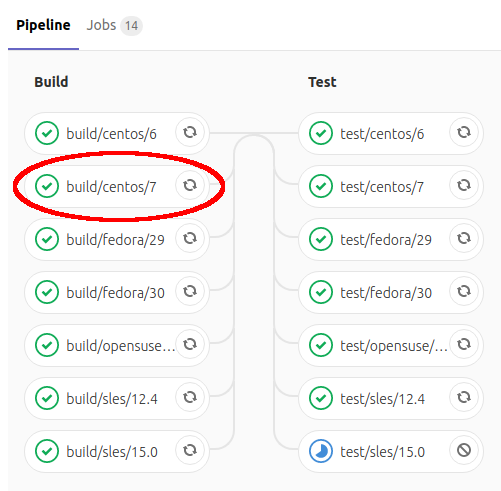
The job’s output appears. On the right-hand sidebar you can browse its artifacts:
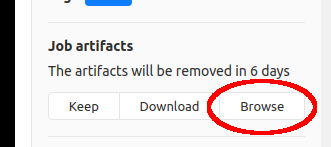
Once there, navigate to build/RPMS/noarch where you’ll find the packages.
Release Packages
To build release packages and upload them to packages.icinga.com tag the release commit and push it.
git tag -s $VERSION-1 -m "Version $VERSION-1"
git push origin $VERSION-1
Now cherry pick the release commit to the default branch so that the changes are transferred back to it.
Attention: Only the release commit. NOT the one switching the build type!
Release Tests
- Start a new docker container and install/run Icinga Web 2 & icingacli.
CentOS
docker run -ti centos:latest bash

yum -y install https://packages.icinga.com/epel/icinga-rpm-release-7-latest.noarch.rpm
yum -y install centos-release-scl
yum -y install icingaweb2 icingacli
icingacli
Debian
docker run -ti debian:stretch bash

apt-get update && apt-get install -y wget curl gnupg apt-transport-https

DIST=$(awk -F"[)(]+" '/VERSION=/ {print $2}' /etc/os-release); \
 echo "deb https://packages.icinga.com/debian icinga-${DIST} main" > \
 /etc/apt/sources.list.d/${DIST}-icinga.list
 echo "deb-src https://packages.icinga.com/debian icinga-${DIST} main" >> \
 /etc/apt/sources.list.d/${DIST}-icinga.list

curl https://packages.icinga.com/icinga.key | apt-key add -
apt-get -y install icingaweb2 icingacli
icingacli
GitHub Release
Create a new release for the newly created Git tag: https://github.com/Icinga/icingaweb2/releases
Hint: Choose tags, pick one to edit and make this a release. You can also create a draft release.
Use the changelog for the release body.
Online Documentation
This is built with a daily cronjob.
Manual Updates
SSH into the webserver or ask bobapple.
cd /usr/local/icinga-docs-tools && ./build-docs.rb -c /var/www/docs/config/icingaweb2-latest.yml
Announcement
- Create a new blog post on icinga.com/blog including a featured image
- Create a release topic on community.icinga.com
- Release email to net-tech & team