Icinga Notifications
Icinga Notifications is a set of components that processes received events from various sources, manages incidents and forwards notifications to predefined contacts. The components are:
- Icinga Notifications, the daemon, which receives events and sends notifications.
- Icinga Notifications Web, the module for Icinga Web, which lets administrators configure Icinga Notifications and analyze its behavior.
- Sources, such as Icinga DB or Icinga for Kubernetes, which submit events to the daemon.
Big Picture
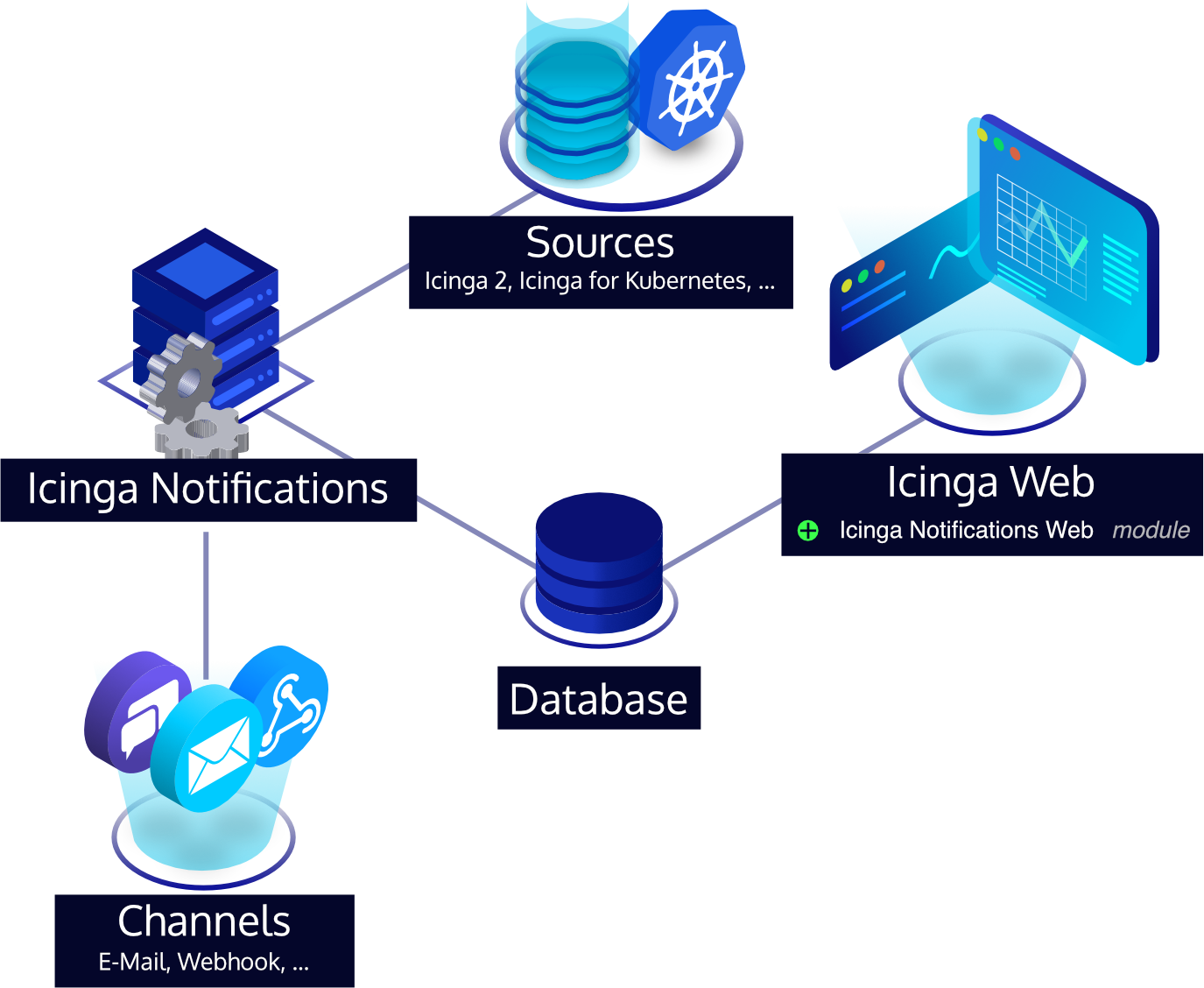
Because Icinga Notifications consists of several components, this section tries to help understand how these components relate.
First, the Icinga Notifications configuration resides in a SQL database. It can be conveniently tweaked via Icinga Notifications Web directly from a web browser. The Icinga Notifications daemon uses this database to read the current configuration.
As in most Icinga setups, all host and service checks are defined in Icinga 2 and processed by Icinga DB. The Icinga DB can act as an Icinga Notifications source to forward state changes, acknowledgements, and other events to the Icinga Notifications daemon. These events are stored in the database and are available for further inspection in Icinga Notifications Web. Next to Icinga DB, other notification sources can be configured.
Depending on its configuration, the daemon will take action on these events.
This optionally includes escalations that are sent through a channel plugin.
Each such channel plugin implements a domain-specific transport, e.g., the email channel sends emails via SMTP.
When configured, Icinga Notifications will use channel plugins to notify end users or talk to other APIs.
Concepts
The documentation uses the following terms.
| Term | Description |
|---|---|
| Source | A system that submits events to Icinga Notifications, e.g. Icinga DB. It authenticates with a username and password or a client certificate. |
| Source type | The kind of a source, e.g. Icinga DB. Event rules are bound to a source type, not to an individual source. |
| Event | A message from a source about something that happened to an object, e.g. a state change of a service or an acknowledgement. |
| Incident | The lifecycle of a problem for an object. It opens when an event reports a problem and closes when the object has recovered. |
| Severity | The importance of an incident or event. Possible values are Ok, Warning, Error, and Critical. |
| Event rule | Defines which events are routed to whom. There are escalation rules and notification rules. |
| Escalation rule | An event rule tied to the lifecycle of an incident. It notifies recipients in stages. |
| Notification rule | An event rule that notifies a fixed set of recipients as soon as an event matches, independent of incidents. |
| Escalation | One stage of an escalation rule. It has a condition, e.g. the incident age or severity, and recipients that are notified once it is met. |
| Recipient | A contact, contact group or schedule that is notified by an escalation or by a notification rule. |
| Contact | A person to notify, with an address for each channel and a default channel. |
| Contact group | A named set of contacts. |
| Schedule | Assigns contacts and contact groups to points in time, e.g. for on-call duty. A schedule is made of rotations. |
| Rotation | A pattern in a schedule that lets its members take turns. Multiple rotations with different priorities can overlap. |
| Channel | A transport for notifications, e.g. email. Channels are provided by the daemon and configured in Icinga Notifications Web. |
| Manager | The user who is responsible for an incident. An incident has at most one manager. |
| Subscriber | A user who subscribed to an incident to follow it. Subscribers are listed separately from recipients. |
Available Sources
Compatible sources are, for example:
Any other software that can submit events to Icinga Notifications’s HTTP API can act as a source as well.
Available Channels
Icinga Notifications comes with multiple channels out of the box:
- email: Email submission via SMTP
- telegram: Telegram
- webhook: Configurable HTTP/HTTPS queries for your backend
See the channel documentation for details.
Additional custom channels can be developed independently of Icinga Notifications, following the channel specification.
Installation
To install Icinga Notifications see Installation.
License
Icinga Notifications and the Icinga Notifications documentation are licensed under the terms of the GNU General Public License Version 2.